Product Overview
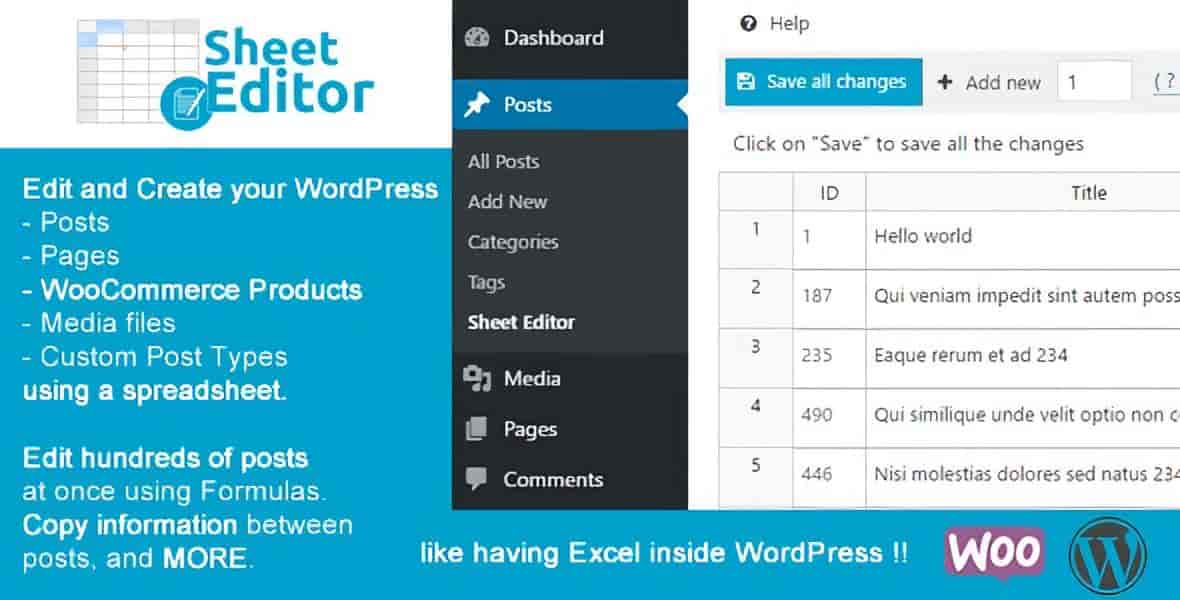
Managing a growing WordPress site means wrestling with repetitive admin tasks — opening dozens of edit screens just to update a category, tweak a user role, or adjust a product attribute. WP Sheet Editor Premium replaces that friction with a single, spreadsheet-style interface that connects directly to your database. Think Excel or Google Sheets, but inside your WordPress admin, editing live data in real time.
Whether you’re a content editor updating hundreds of posts, a WooCommerce store manager organizing product variations, or an administrator cleaning up user accounts, this plugin turns hours of clicking into minutes of copy-paste efficiency.
Key Features
- Dedicated Spreadsheets for Every Taxonomy — Separate, organized sheets for categories, tags, product attributes (colors, sizes, custom attributes), and any custom taxonomy.
- Live Database Connection — No CSV imports, no exports, no synchronization. Every cell edit writes instantly to your WordPress database.
- Bulk Post & Page Editing — Update titles, content, excerpts, status, dates, authors, custom fields, and taxonomy terms across hundreds of posts simultaneously.
- Bulk User Management — Edit user profiles, roles, display names, emails, and custom user meta in one view.
- Advanced Search & Filtering — Find exactly what you need by keyword, parent term, description, image, custom field, or any combination.
- WooCommerce Product Attribute Control — Create and manage product categories, tags, attributes, and variations at scale — ideal for stores with large catalogs.
- Copy-Paste & Formula Support — Leverage spreadsheet workflows: drag-fill, copy rows, paste from Excel/Sheets, apply formulas across columns.
Benefits
The core benefit is simple: reclaim the time you spend navigating the WordPress admin. Specific advantages include:
- Content Editors & Publishers — Update hundreds of posts or pages in a single session. Batch-edit SEO metadata, swap categories, fix typos across the site.
- WooCommerce Store Owners — Manage product attributes, variations, categories, and tags without jumping between product edit screens. Prepare seasonal catalogs in minutes.
- Site Administrators & Developers — Bulk-update user roles, migrate custom field data, clean up taxonomy structures, and audit content — all from one interface.
- Agencies & Freelancers — Deliver faster turnaround on content migrations, site audits, and bulk updates for clients.
How It Can Be Used
- Create dozens of product categories and tags before importing a new product catalog
- Update meta descriptions and SEO titles across 500+ posts in one spreadsheet view
- Standardize user roles and profile data after a membership plugin migration
- Manage event categories, portfolio taxonomies, or any custom post type taxonomy
- Run complex queries — e.g., “find all products missing a size attribute in the ‘Shirts’ category” — and fix them inline
- Prepare content staging: edit offline in Google Sheets, paste into WP Sheet Editor, go live instantly
Why Choose WP Sheet Editor Premium?
Most bulk-edit tools rely on import/export cycles — export CSV, edit externally, re-import, hope nothing breaks. WP Sheet Editor Premium is different: it’s a live, two-way spreadsheet layer on top of your WordPress database. You see real data, edit real data, and changes are live the moment you leave a cell. No staging tables, no sync buttons, no “oops I overwrote the wrong rows” disasters.
It’s built for professionals who manage WordPress at scale and need a tool that matches their workflow — not the other way around.
Frequently Asked Questions
- Does WP Sheet Editor require import/export?
- No. The plugin maintains a live connection to your WordPress database. Every edit applies instantly — no CSV files, no sync process, no waiting.
- Can I edit WooCommerce product attributes like colors and sizes?
- Yes. Dedicated spreadsheets let you create, rename, reorder, and assign product attributes (including colors, sizes, and any custom attribute) in bulk.
- Is this plugin suitable for WooCommerce stores?
- Absolutely. It’s widely used by store managers to handle product categories, tags, attributes, and variations across large catalogs without opening individual product pages.
- How does search work inside the spreadsheet?
- You can filter by keyword, parent category, description, image presence, custom fields, and any taxonomy term — combining multiple criteria to pinpoint exact rows.
- Will it work with my custom post types and taxonomies?
- Yes. The plugin automatically detects registered custom post types and taxonomies, giving each its own spreadsheet.
Conclusion
If you’ve ever wished WordPress had a “find and replace” that actually worked across your entire content library — or an “edit all” button that didn’t require 400 clicks — WP Sheet Editor Premium is that tool. It brings spreadsheet power to WordPress content management, live and direct. Install it, open a sheet, and see how much faster bulk editing can be.