banner

WooCommerce Password Protection Plugin — Protect Categories & Store

img

Product Overview

Take full control of your WooCommerce store’s accessibility with this powerful password protection plugin. Whether you’re running a wholesale storefront, a members-only shop, or simply need to hide a product launch until the right moment, this plugin gives you the flexibility to protect exactly what you need — and nothing you don’t.

Designed for store owners who require granular access control, it lets you password-protect your entire WordPress site, specific shop sections, individual product categories, single products, or standalone pages. You create the passwords and distribute them only to authorized users, keeping your exclusive content truly exclusive.

Key Features

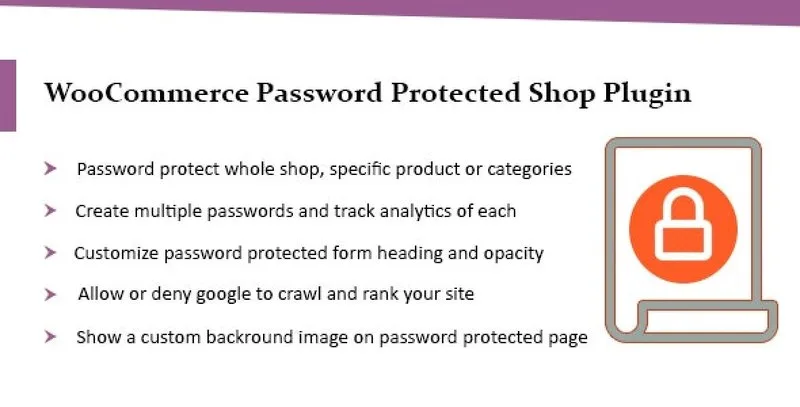
  • Flexible Protection Scope: Password-protect your entire WordPress site, specific store sections, individual product categories, single products, or specific pages — you decide exactly what stays private.
  • Multiple Password Support: Create multiple passwords separated by commas or import them directly from a CSV file. Perfect for distributing different credentials to different customer groups or teams.
  • Rules-Based Password Assignment: Set up intelligent rules to automatically assign different passwords to different pages or categories, saving time when managing large catalogs with varying access levels.
  • Custom Password Form Styling: Display a custom background image on password-protected pages and customize the form header, messaging, and opacity to match your brand identity.
  • SEO Control: Choose whether to allow or disallow Google from crawling and ranking your password-protected pages. Keep protected content out of search results, or allow indexing when appropriate.
  • Password Usage Analytics: Access detailed analysis reports for each password to monitor usage patterns and identify if any credential is being shared or misused.

Benefits

This plugin transforms your WooCommerce store into a flexible, access-controlled platform. Wholesale businesses can hide pricing from retail customers. Membership sites can offer exclusive product collections to paying members. Launching a new product line? Keep it hidden until you’re ready to go public. The possibilities are extensive.

Unlike basic protection methods, this plugin offers professional-grade features like CSV password import, usage analytics, and granular rules-based assignment. You’re not just adding a password gate — you’re implementing a complete access management system for your e-commerce store.

How It Can Be Used

  • Wholesale Stores: Show products and pricing only to approved wholesale buyers by protecting your wholesale category with a shared password.
  • Membership Sites: Offer exclusive product collections to members by placing them in password-protected categories and sharing credentials upon membership signup.
  • Pre-Launch Hiding: Build your new product catalog in advance and password-protect it until launch day, then simply remove the protection when you’re ready.
  • Internal Company Stores: Create an employee-only store section with company merchandise or benefits accessible only via internal passwords.
  • Regional Restrictions: Share different passwords with different regions or distributors to control which products they can view and purchase.

Specifications

  • Version: 3.34.2
  • License: GPL — Unlimited Domain Usage
  • Updates: Lifetime updates included (manual update)
  • File Status: 100% clean files, free from viruses
  • Compatibility: WordPress and WooCommerce

Why Choose This Product?

This plugin stands out because it combines simplicity with power. You don’t need coding knowledge to set up password protection, yet you get advanced features like rules-based assignment, CSV imports, and usage analytics that enterprise-level solutions charge premium prices for. The unlimited domain GPL license means you can use it across as many sites as you need without additional costs.

The ability to control SEO indexing is particularly valuable. Many password protection plugins force protected pages out of search results entirely. This plugin gives you the choice, so you can maintain search visibility for pages that are meant to be found but require authentication to view.

Frequently Asked Questions

  • Can I protect specific product categories only? Yes, you can password-protect individual categories, specific products, pages, or your entire store. The choice is completely yours.
  • Can I create more than one password? Yes, you can create multiple passwords separated by commas or import them from a CSV file. This is ideal for giving different passwords to different customer groups.
  • Will password-protected pages show up in Google search results? You have full control over this. You can choose to allow or disallow Google from crawling and ranking your password-protected pages based on your SEO strategy.
  • Can I customize how the password form looks? Yes, you can add a custom background image to password-protected pages and customize the form header, messaging, and opacity to match your site’s design.
  • Can I track if someone is sharing my password? Yes, the plugin includes an analysis report feature for each password so you can monitor usage and identify potential misuse.

Conclusion

If you need to control who can access parts of your WooCommerce store, this password protection plugin delivers the features, flexibility, and control you need. From simple single-password protection to advanced rules-based systems with analytics, it scales to match your business requirements while remaining easy to configure and manage.

Lock down your WooCommerce store with professional-grade password protection. Restrict access to specific categories, products, pages, or your entire site — and share credentials only with the people who need them. Password-protect categories, products, pages, or your entire store Create multiple passwords or import them from CSV Customize the password form appearance with background images Control whether protected pages appear in Google search results Track password usage with detailed analytics reports