WooCommerce shows related products based on shared categories or tags by default. That logic works for some stores, but it often surfaces irrelevant items — hurting cross-sell potential and confusing shoppers. WooCommerce Custom Related Products Pro replaces the native behavior with a flexible, rule-based system so you decide exactly what appears in the related products section on every single product page.
Whether you want to promote high-margin accessories, clear seasonal inventory, or guide buyers through a curated collection, this plugin gives you the control to do it — product by product.
Increase average order value by surfacing the right cross-sells and upsells on every product page. Reduce decision fatigue — shoppers see relevant, curated options instead of a random assortment. Improve mobile experience with the optional slider that keeps the product page clean. Save time — set rules once per product or apply category/tag logic across groups without manual linking for every SKU.
Unlike heavier recommendation engines that require external services, monthly fees, or complex AI training, this plugin runs entirely on your WordPress site. It’s lightweight, GPL-licensed, works on unlimited domains, and receives lifetime updates. No subscription, no external dependencies — just a straightforward tool that does one thing well: lets you decide what “related” actually means.
Yes. When you configure custom rules for a product, those rules take over. You can also choose to hide the default related products entirely when no custom rules exist.
The plugin lets you choose the source: manual product selection, categories, or tags. You pick one method per product.
Yes. The slider option adapts to screen size for a smooth touch experience.
The plugin uses standard WooCommerce hooks and templates, so it works with most well-coded themes. If your theme heavily overrides the related products template, minor CSS adjustments may be needed.
Yes — lifetime manual updates are included with the GPL license.
Default related products are a missed revenue opportunity. With WooCommerce Custom Related Products Pro, you turn that section into a deliberate sales tool — curated, relevant, and fully under your control. Install once, configure per product or by category/tag, and start showing shoppers the products you actually want them to buy.
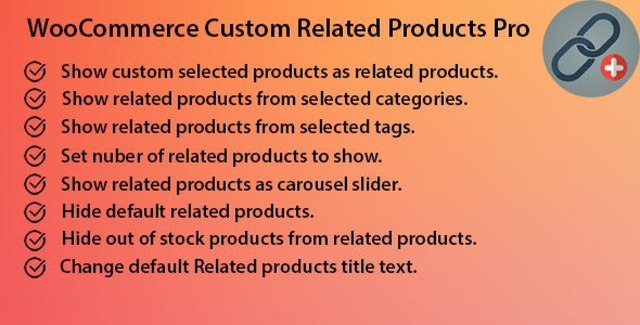
Take full control of your WooCommerce related products. Display hand-picked items, filter by category or tag, enable a slider, hide out-of-stock products, and customize the section title — all without code.Select specific products, categories, or tags as related itemsSet the exact number of products to displayShow related products in a responsive sliderHide default related products when no custom ones are setAutomatically exclude out-of-stock itemsRename the "Related Products" heading to match your brand
From multipurpose themes to niche templates