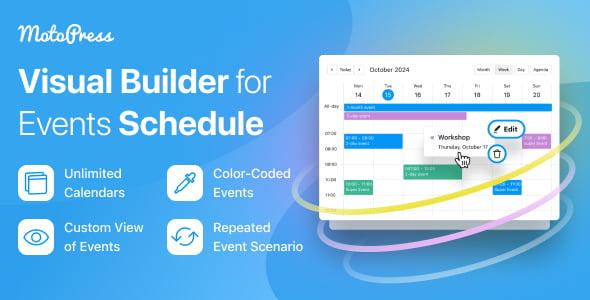
The Events Calendar by MotoPress is a multifunctional WordPress event calendar plugin designed to help site owners create clean, professional schedules and timetables for any purpose. Whether you manage class schedules, plan large conferences, or organize community events, this plugin delivers a centralized scheduling experience directly within your WordPress site.
With an intuitive visual interface, you can add, edit, and delete events without navigating through multiple menus. Get a complete overview in calendar or list view, and keep everything organized with color-coded events, highlighted hosts, and location details.
This WordPress event calendar plugin streamlines your scheduling process and enhances the user experience for your visitors. Instead of juggling multiple tools or messy spreadsheets, you get one centralized system for all your events. Visitors can quickly find what they need, which boosts engagement and keeps them coming back.
The flexibility to display schedules in various formats means you can adapt the calendar to your audience’s preferences. Schools can publish class timetables, businesses can share event schedules, and community organizers can coordinate activities across different locations—all from a single plugin.
The MotoPress Events Calendar is ideal for a wide range of organizations and use cases:
The Events Calendar by MotoPress combines powerful scheduling functionality with an easy-to-use interface. You don’t need technical expertise to create beautiful, informative calendars. The plugin handles complex scheduling needs—including recurring events, color coding, and multiple view formats—while keeping the front-end experience clean and user-friendly. Whether your schedule is simple or complex, this plugin adapts to your needs.
Here are answers to common questions about the MotoPress Events Calendar:
Take your website to the next level with the Events Calendar by MotoPress. Simplify your scheduling needs, enhance user engagement, and present your events in a clean, professional format. Try it today and see the difference for yourself.
Transform your WordPress site into a scheduling powerhouse with the Events Calendar by MotoPress. Manage complex schedules through a fully visual interface with weekly, monthly, daily, and list views.Fully visual event management—add, edit, and delete without switching menusMultiple display formats: calendar, list, and timetable viewsColor-code events and highlight hosts and locations instantlySet up recurring activities and display events of any duration
From multipurpose themes to niche templates