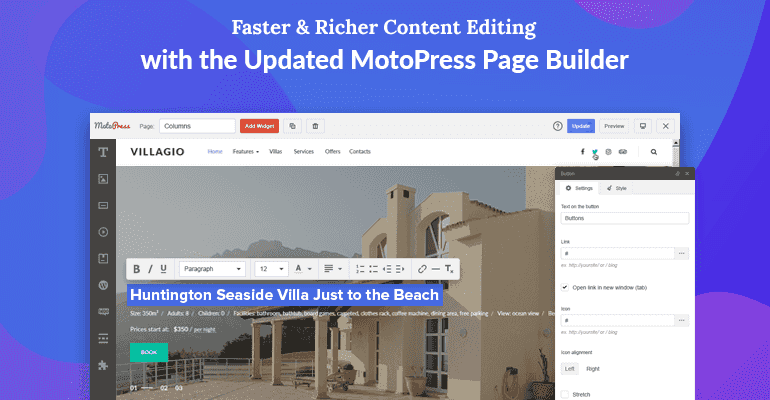
The MotoPress Content Editor + Addons for WordPress is a powerful drag-and-drop page builder that transforms the way you create and manage content. Instead of wrestling with backend code or restrictive shortcodes, you can visually build and edit pages, posts, and custom post types directly on the frontend of your website. This intuitive editor gives you full control over design and layout, making it easier than ever to craft a stunning website that aligns with your vision.
MotoPress is versatile and can be used to create a wide variety of content types:
Because it works with any theme, you can apply MotoPress to existing or new projects without worrying about compatibility issues.
If you’re looking for a WordPress content editor that combines power with simplicity, MotoPress is an excellent choice. It offers the flexibility of a premium page builder without the common drawbacks of shortcode lock-in. The frontend editing experience is intuitive, making it accessible to users of all skill levels. With a wide range of modules and styling options, you can create professional, responsive layouts that stand out.
No, MotoPress is designed to be user-friendly and does not require backend coding. You can visually build and edit content using drag-and-drop and styling tools.
Yes, MotoPress is designed to work with any theme, so you can use it with your existing setup.
No, MotoPress avoids the shortcode locking effect, meaning your content remains flexible and portable.
You can create pages, posts, and custom post types, making it suitable for a wide range of website content.
MotoPress Content Editor + Addons for WordPress is a robust solution for anyone who wants to build and manage a beautiful website without the hassle. Its frontend drag-and-drop interface, compatibility with any theme, and freedom from shortcode limitations make it a smart choice for modern WordPress users. Take your website to the next level and experience a more efficient way to create content—start exploring the possibilities today.
Build and manage WordPress content visually with the MotoPress drag-and-drop editor. Create pages, posts, and custom post types directly on the frontend—no shortcode locking, no backend coding. Enjoy a user-friendly toolkit with a wide range of content modules and styling options. Frontend drag-and-drop editing Works with any theme No shortcode locking effect Wide range of content modules and styling options
From multipurpose themes to niche templates