Inactive Logout Pro is a WordPress security plugin designed to enhance your site’s login protection by automatically logging users out after a configurable period of inactivity. Whether you run an e-commerce store, a membership site, or any WordPress-powered platform where account security matters, this plugin gives you precise control over user session management and logout behavior.
The Pro version extends the core functionality with advanced features like automatic browser logout closure detection, multi-login session replacement, and granular user-level controls. It is built to be fast, secure, and easy to configure without requiring any coding knowledge.
Delivered under a GPL license, Inactive Logout Pro includes lifetime manual updates, unlimited domain usage, and 100% clean files free from viruses. The current version is v3.34.2.
Enhanced Account Security: By automatically logging out inactive users, you reduce the risk of unauthorized access from unattended sessions. This is especially critical for sites where multiple users share workstations or public devices.
Full Session Control: The multi-login replacement feature ensures that only one active session exists per account at a time. If someone attempts to access an account from a different location, you will be alerted and can take action immediately.
Granular User Management: Rather than applying a one-size-fits-all logout policy, you can configure different behavior for different users and roles. This flexibility means administrators, editors, and subscribers can each have session rules that match their access needs.
No Disruption to Critical Pages: The ability to disable inactive logout on select pages means you can maintain security across your site while ensuring users don’t get logged out during important workflows like completing a purchase or filling out a form.
Inactive Logout Pro is ideal for any WordPress site that handles user accounts and wants to add an extra layer of login security. Common use cases include:
No Coding Skills Required: From installation to configuration, Inactive Logout Pro is designed to be straightforward. You do not need any coding experience to set up or customize the plugin to your needs.
Fully Responsive: The plugin works seamlessly across all devices, ensuring that your WordPress site remains navigable on mobile devices, tablets, and desktops without any issues for your users.
Fast and Secure: Built with minimal dependencies and optimized code, the plugin is designed to run efficiently without slowing down your site. Clean, spaghetti-code-free development ensures reliable performance.
Developer-Friendly: Built with developers in mind, the plugin features clean and extensible code with hooks and filters, making it easy to customize or integrate with other plugins and themes.
SEO Friendly: The plugin is built with SEO-friendly code practices so you can trust that it will not negatively impact your site’s search engine rankings.
No. The plugin is designed to be configured without any coding skills. Installation and setup are straightforward and can be completed directly from your WordPress dashboard.
Yes. The plugin supports different inactivity intervals for different users and roles. You can disable, redirect, or set custom intervals separately for individual users. Some advanced user-level functionality is currently under development.
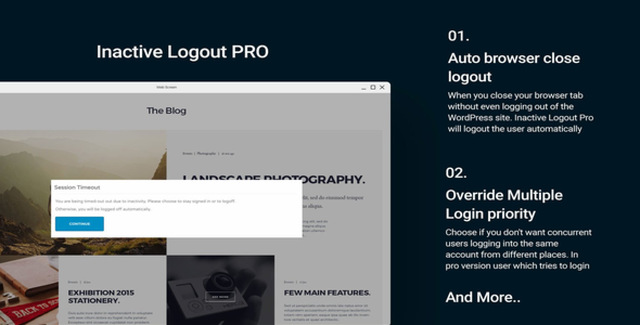
With the Automatic Browser Logout Closure feature, Inactive Logout Pro will automatically log the user back in after 2 minutes of the browser tab being closed, ensuring session continuity while maintaining security controls.
Yes. The Replace Multiple Login Priority feature prevents simultaneous logins from different locations. When a new login is detected, the user who recently attempted to log in receives a notification, and you can hijack the session via the administrative email activation link if you suspect compromise.
Yes. The plugin includes a feature that allows you to disable Inactive Logout on specific pages where continuous sessions are necessary, such as checkout or form pages.
Inactive Logout Pro is a versatile WordPress security plugin that gives you complete control over user session management. With features like automatic browser logout closure, multi-login replacement, individual user configuration, and page-specific logout controls, it provides a comprehensive approach to protecting your WordPress site from unauthorized access. Combined with a GPL license, lifetime updates, and an easy-to-use interface, Inactive Logout Pro is a practical security solution for any WordPress site that takes user account protection seriously.
Protect your WordPress site with Inactive Logout Pro, a powerful security plugin that automatically logs users out after periods of inactivity. Prevent unauthorized access and manage user sessions with full control over logout behavior, browser closure detection, and multi-login replacement.Automatic browser logout closure detectionReplace multiple login sessions for account securitySet different inactivity intervals per user or roleDisable inactive logout on specific pagesNo coding skills required for setupLifetime manual updates includedGPL license with unlimited domain usageVersion 3.34.2 with clean, virus-free files