Product Overview
Dashify Pro reimagines the WooCommerce administration experience. Built for store owners and managers who want a cleaner, faster way to handle daily operations, it replaces the default WordPress admin clutter with a purpose-built e-commerce interface — think Shopify polish, inside WordPress.
Key Features
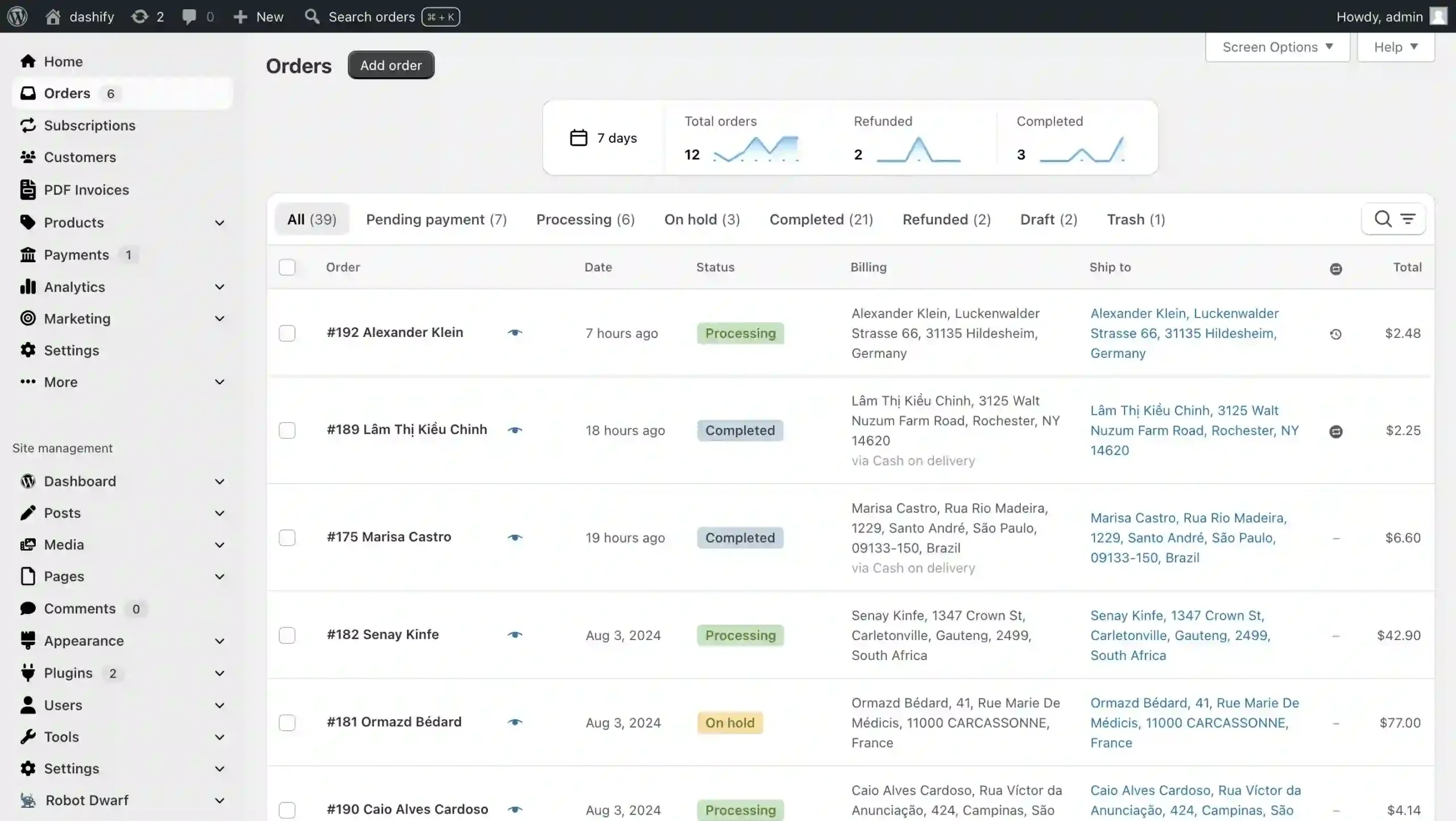
- Order Visualization: View orders in a modern, card-based layout that mirrors Shopify’s clarity — order details, status, and actions at a glance.
- WooCommerce-First Navigation: Core WooCommerce features sit front and center; WordPress menu items move to the bottom, out of your workflow.
- Previous/Next Order Navigation: Jump between orders with one click or keyboard shortcut. Filter by status to only cycle through pending, processing, or completed orders.
- Order Trend Charts: Instant performance snapshots — orders, refunds, and completions across customizable time periods.
- Localized Date & Time: Timestamps automatically display in your region’s format.
- Prominent Status Filters: Large, clickable filter chips replace WooCommerce’s easy-to-miss dropdowns.
- Floating Bulk Actions: Mass-action bar stays visible while scrolling long order lists — no more scrolling up to apply changes.
- Collapsible Search & Filters: Advanced filters tuck away when not needed, keeping the list view clean.
- Timeline View for Order Notes: Chronological history with auto-expanding note fields for longer entries.
- Back Button & Global Search: Return to the order list instantly; search by ID, name, email, phone, or SKU from any admin screen.
- Mobile-Responsive Order & Product Tables: Fully usable on phones and tablets — manage the store from the warehouse floor.
- Custom Field Control: Hide irrelevant custom fields per order view.
- Flexible Item Sorting: Sort line items by SKU for warehouse picking efficiency, or by menu order to match your shop page layout.
Benefits
- Faster Order Processing: Visual layout, keyboard shortcuts, and floating actions cut clicks per order.
- Reduced Training Time: Intuitive, Shopify-familiar interface means new staff ramp up quicker.
- Better Mobile Management: Check and update orders from anywhere — no desktop required.
- Cleaner Workspace: Hidden filters, relocated WordPress menus, and collapsible sections reduce cognitive load.
- Data at a Glance: Trend charts and localized timestamps surface insights without digging.
How It Can Be Used
- High-volume stores processing dozens of orders daily — speed up fulfillment with visual order cards and keyboard navigation.
- Teams migrating from Shopify — preserve the admin experience they already know.
- Warehouse staff picking/packing on tablets — mobile-responsive tables and SKU-sorted line items match physical workflows.
- Store managers monitoring performance — trend charts deliver instant health checks without leaving the orders screen.
Why Choose Dashify Pro?
Most admin plugins add features. Dashify Pro redesigns the foundation. It doesn’t just bolt tools onto WooCommerce — it rebuilds the interface around how e-commerce businesses actually work: order-centric, mobile-ready, and distraction-free. The result is an admin panel that feels like it was made for selling, not for managing WordPress.
Frequently Asked Questions
- Does Dashify Pro replace the default WooCommerce admin pages?
- Yes. It overrides the order list, order edit, and product list screens with its own modern templates while preserving all core WooCommerce functionality.
- Is it compatible with other WooCommerce extensions?
- Dashify Pro is built to work alongside standard WooCommerce extensions. Custom fields from third-party plugins appear in the order preview and can be shown or hidden per your preference.
- Can I use it on a multisite network?
- The plugin activates per site. Each store in a multisite network can run Dashify Pro independently.
- Does it work on mobile browsers?
- Yes. The order and product tables are fully responsive and tested on phones and tablets — no separate app needed.
- Are there keyboard shortcuts for power users?
- Previous/next order navigation supports keyboard shortcuts, and the global search is accessible from any admin page via a hotkey.
Conclusion
If your team lives in the WooCommerce admin, Dashify Pro pays for itself in time saved and errors avoided. It brings the clarity and speed of a modern SaaS dashboard to your self-hosted store — without migrating platforms. Install it, activate it, and start working in an admin panel built for e-commerce.