banner

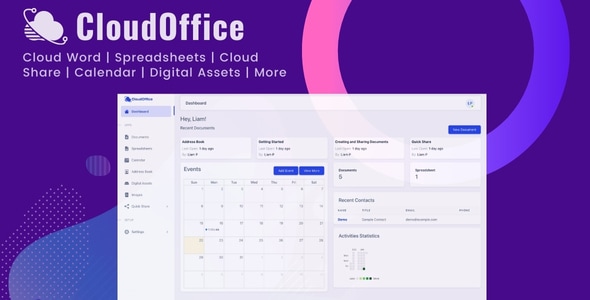
CloudOffice Self-Hosted Office Suite PHP Script

img

Product Overview

CloudOffice is a feature-rich, self-hosted office suite built on PHP that delivers a full productivity ecosystem — documents, spreadsheets, file storage, image editing, and calendaring — all running on your own infrastructure. It eliminates the need for expensive SaaS subscriptions while giving organizations complete sovereignty over their data.

Designed for teams, agencies, and privacy-conscious businesses, CloudOffice replicates the core experience of major cloud office platforms without vendor lock-in. Every application in the suite communicates natively, so users move from writing a document to analyzing a spreadsheet to attaching a file from cloud drive without friction.

Key Features

  • Cloud Word: Create and edit rich text documents with advanced formatting, track changes, comments, and real-time co-authoring. Supports import/export of DOCX, ODT, PDF, and plain text formats.
  • Spreadsheet: Full-featured spreadsheet application with 300+ mathematical functions, pivot tables, dynamic charts, conditional formatting, and simultaneous multi-user editing for collaborative data analysis.
  • Cloud Drive: Centralized file repository with folder hierarchies, drag-and-drop upload, version history, granular sharing permissions (view, comment, edit), and public link generation with expiration controls.
  • Cloud Image Editing: Browser-based image editor for cropping, resizing, filters, annotations, and format conversion — no external tools or plugins required.
  • Calendar: Integrated scheduling with event creation, recurring appointments, reminders, and cross-app linking. Attach Drive files to events or link Word docs to meeting notes.
  • Unified Interface: Single sign-on across all modules with a consistent UI, global search, and keyboard shortcuts that work suite-wide.
  • Self-Hosted Deployment: Install on your own VPS, dedicated server, or private cloud. Supports Apache/Nginx, MySQL/MariaDB/PostgreSQL, and standard PHP extensions. No external API dependencies.

Benefits

  • Data Sovereignty: Zero third-party access. Your documents, spreadsheets, and files reside exclusively on hardware you control — critical for GDPR, HIPAA, and internal compliance requirements.
  • Cost Predictability: One-time license replaces per-user monthly subscriptions. Ideal for organizations with 20+ users where SaaS costs compound rapidly.
  • Customization Freedom: Access to source code means you can extend functionality, integrate with internal systems (LDAP/SAML, ERP, CRM), or white-label the interface.
  • Offline-Ready Architecture: Since the suite runs on your network, it remains accessible during internet outages — essential for air-gapped or hybrid environments.
  • Team Collaboration Without Compromise: Real-time editing, commenting, and presence indicators deliver the collaborative experience users expect, entirely within your trust boundary.

How It Can Be Used

  • Internal knowledge base and document management for SMBs and enterprises
  • Client portal for agencies delivering branded, private workspaces
  • Educational institutions needing FERPA-compliant collaboration tools
  • Legal and healthcare practices requiring on-premise document handling
  • Development teams wanting a self-hosted alternative to Notion or Confluence for specs and wikis
  • Resellers and MSPs offering hosted productivity as a value-added service

Technical Specifications

  • Platform: PHP 8.0+ (script-based, not a compiled binary)
  • Web Server: Apache 2.4+ or Nginx 1.18+
  • Database: MySQL 5.7+, MariaDB 10.3+, or PostgreSQL 12+
  • Required Extensions: GD/Imagick, cURL, OpenSSL, mbstring, XML, ZIP, PDO
  • Storage: Local filesystem, S3-compatible, or network mounts
  • Authentication: Built-in user management with role-based access; LDAP/SAML/OAuth2 extensible
  • Installation: Web-based setup wizard with environment validation

Why Choose CloudOffice?

Most self-hosted alternatives focus on a single function — OnlyOffice for docs, Nextcloud for files, EtherCalc for sheets. CloudOffice unifies every core productivity need into one cohesive, interoperable suite with a single codebase, one update cycle, and a consistent user experience. For organizations that have evaluated the fragmented landscape and want a turnkey deployment without stitching together five different Docker containers, CloudOffice reduces operational overhead while delivering feature parity with the core apps teams use daily.

Frequently Asked Questions

Can I migrate existing Google Workspace or Microsoft 365 documents?

Yes. Cloud Word and Spreadsheet support importing DOCX, XLSX, PPTX, ODT, ODS, CSV, and PDF files. Batch migration tools are available via the admin panel.

Is there a mobile app?

The suite is fully responsive and works in mobile browsers. Native iOS/Android apps are on the roadmap but not included in the current release.

What are the server requirements for 50 concurrent users?

A 4 vCPU / 8 GB RAM VPS with SSD storage handles 50 concurrent editors comfortably. Scale vertically or add a load balancer for larger deployments.

Can I customize the branding and UI?

Yes. The source code is unencrypted. You can modify logos, color schemes, login pages, and email templates directly.

Does it support OnlyOffice or Collabora integration?

CloudOffice uses its own native editors for Word and Spreadsheet. It does not require or integrate with OnlyOffice/Collabora servers.

Conclusion

CloudOffice delivers a rare combination: the collaborative polish of a SaaS productivity suite with the architectural freedom of self-hosted software. If your organization values data ownership, predictable costs, and the ability to extend your tools rather than adapt to them, this PHP script provides a production-ready foundation you can deploy this week and customize for years.

CloudOffice is a complete self-hosted office suite PHP script that delivers a private alternative to Google Workspace and Microsoft 365. Deploy on your own server for full data ownership, zero recurring fees, and complete privacy control. Word processor, spreadsheet, cloud drive, image editor, and calendar in one suite Real-time collaboration across all applications Self-hosted on your infrastructure — your data never leaves your servers PHP-based, installable on standard LAMP/LEMP stacks One-time license replaces per-user monthly SaaS subscriptions