Product Overview
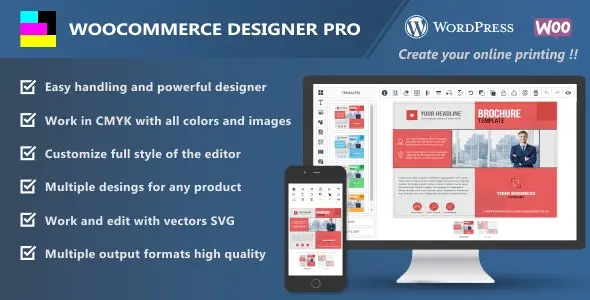
WooCommerce Designer Pro is a comprehensive WordPress plugin that brings a powerful online product design editor directly into your WooCommerce store. It empowers your customers to personalize products with an intuitive interface featuring cliparts, shapes, text effects, SVG editing, QR codes, static maps, and much more. Whether you are selling custom apparel, business cards, promotional flyers, or any product that benefits from customer-driven design, this plugin gives your shoppers the tools they need to create exactly what they envision.
Key Features
- CMYK and RGB Workspace – Customers can select between CMYK or RGB workspaces with one click. Uploaded images, including SVG vectors, are automatically converted to CMYK.
- Multiple Design Templates – Add multiple design templates to the templates section so customers can choose and create more comfortably.
- Custom Colors – Customize the editor’s overall style to match your website’s color scheme.
- Categorized Cliparts – Organize a variety of cliparts by category so customers can easily find and customize their products. Categories can be individually attached in display parameters according to the project theme.
- QR Code Support – Add QR codes to designs for easy smartphone access to information, making it a valuable tool for marketing professionals.
- SVG Editing – Change vector colors quickly and easily. Group and ungroup SVG files to create designs efficiently.
- Static Maps – Allow customers to add maps to business cards or flyers for more efficient business promotion.
- Mask Layers – Add mask layers to images with text, cliparts, or shapes.
- Multiple Alignment Options – Align objects to a grid, vertically, with adjustable spacing, or align layers with each other. Layers adjust to guidelines as they are moved.
- Shapes Library – Add circles, stars, squares, and more to highlight text, images, or create visual offers.
- Text Effects – Apply curved, reversed, arched, small-to-large, large-to-small, and protruding text effects.
- Calendar Images – Add calendar images by category, ideal for business cards, with individual category attachment based on project theme.
- Transform Tools – Move, resize, rotate, tilt, and flip any text, shape, or clipart.
- Layer Management – Identify layers by image or icon, name them, sort them, lock them, unlock them, or delete them quickly.
- Save and Download Designs – Customers can save, download, and manage their designs directly from the editor. The download option can be disabled in plugin settings.
- Image Cropping – Crop images to the exact size desired.
- Image Filters – Provide filter options so customers can easily adjust their photos.
- Project Management – Customers can manage saved designs on a page you choose in the plugin settings.
- Custom Bleed Area – Adjust the height and width of the bleed area, change the color, and set the radius.
- WooCommerce Variation Pricing – 100% compatible with WooCommerce product variations.
- Google Fonts and Custom Fonts – Choose from over 800 Google fonts or upload custom font files in TTF, EOT, WOFF, and WOFF2 formats.
- Custom Color Palette – Add or remove colors for customers to use in texts, shapes, vectors, and backgrounds.
- Watermark Protection – Add watermarks when customers download designs to protect against unauthorized copies.
- Multiple Output Formats – Configure output file dimensions and generate JPG, PNG, SVG, PDF, JSON, and CMYK 300DPI high-resolution files.
- Powerful Toolbar – Select and delete all, grid alignment, vertical and horizontal flip, rotate, bring to front, send to back, lock and group layers, duplicate, undo, redo, and preview designs.
- Keyboard Shortcuts – Speed up the design process with customizable keyboard shortcuts for both you and your customers.
- WPML Compatibility – Compatible with the WPML plugin and can be translated into any language worldwide.
Benefits
By integrating WooCommerce Designer Pro into your store, you offer your customers a professional-grade design experience without leaving your website. This means higher engagement, more personalized orders, and a competitive edge in your market. The plugin’s compatibility with WooCommerce variations ensures seamless integration with your existing product structure, while WPML support makes it suitable for international stores. The customizable keyboard shortcuts and powerful toolbar cater to both casual users and experienced designers, ensuring everyone can work efficiently.
How It Can Be Used
- Custom apparel and merchandise stores
- Business card and print-on-demand services
- Flyer and promotional material design
- Custom product personalization for any niche
- Marketing materials with QR code integration
Specifications
- Plugin Version: v3.34.2
- License: GPL – Unlimited domain usage
- Updates: Lifetime updates (manual)
- Demo: Elementor PRO
- Compatible: WooCommerce variations, WPML
- Supported Font Formats: TTF, EOT, WOFF, WOFF2
- Output Formats: JPG, PNG, SVG, PDF, JSON, CMYK 300DPI
- Google Fonts: 800+ available
Why Choose This Product?
WooCommerce Designer Pro combines an extensive feature set with straightforward usability. From categorized cliparts and rich text effects to SVG editing capabilities and watermark protection, every element is designed to give your customers a smooth, professional design experience. With support for over 800 Google fonts, custom font uploads, and multiple high-resolution output formats, your customers have everything they need to create compelling, print-ready designs right on your site. The unlimited domain usage under the GPL license makes it a smart investment for agencies and multi-site operators as well.
Frequently Asked Questions
Does WooCommerce Designer Pro support WooCommerce product variations?
Yes, the plugin is 100% compatible with WooCommerce variations, allowing you to assign different pricing to different design options.
What output formats are supported?
The plugin supports JPG, PNG, SVG, PDF, JSON, and CMYK 300DPI high-resolution output formats.
Can I add custom fonts to the design editor?
Yes. You can choose from over 800 Google fonts or upload custom font files in TTF, EOT, WOFF, and WOFF2 formats.
Is WooCommerce Designer Pro compatible with WPML?
Yes, it is compatible with the WPML plugin and can be translated into any language worldwide.
Can I prevent customers from downloading their designs?
Yes, you can disable the download option in the plugin settings if needed.
Conclusion
WooCommerce Designer Pro is a feature-rich WordPress plugin that transforms your WooCommerce store into a full-featured product design platform. With its extensive toolset, customizable interface, and broad compatibility, it provides everything you need to offer customers a seamless, professional design experience. Whether you are running a print shop, a custom merchandise store, or any business that benefits from product personalization, this plugin delivers the capabilities your customers expect.