PDFMentor Pro is a comprehensive WordPress plugin built specifically for users who rely on Elementor to design their websites. It enables you to generate professional-quality PDFs from any page, blog post, or custom post type — while preserving the exact layout, design, and visual structure you see on your live site.
Most PDF generator plugins extract text and strip away unsupported elements, leaving broken layouts and misaligned columns. PDFMentor Pro solves this problem by rendering your Elementor-designed pages into static, print-ready documents that maintain their original appearance.
PDFMentor Pro helps you present a polished, professional image to clients, partners, and audiences. Whether you need a portfolio PDF, a media kit, a downloadable brochure, or an offline reference of your website, this plugin ensures your brand identity remains consistent across every touchpoint.
By delivering a PDF that closely mirrors your live site, you reinforce credibility and trust — something generic PDF generators simply cannot guarantee.
Many PDF generator plugins on the market extract content but fail to support the full range of Elementor elements. When unsupported elements appear, the layout breaks — columns scatter, and the final PDF looks nothing like your website.
PDFMentor Pro addresses this gap by prioritizing layout fidelity and design consistency. It is the smarter choice for anyone who cares about how their PDFs look and wants a reliable solution that respects their Elementor designs.
PDFMentor Pro is designed to support Elementor elements and preserve layout structure. However, certain advanced or dynamic elements may have limited support, as with any PDF generation tool.
Yes. PDFMentor Pro supports generating PDFs from pages, blogs, and custom post types created with Elementor.
PDFMentor Pro aims to replicate your website’s layout and design as closely as possible, maintaining columns, sections, and visual elements in the generated PDF.
PDFMentor Pro integrates with Elementor. Please check the plugin documentation for specific compatibility requirements.
Absolutely. PDFMentor Pro is built with end users in mind and offers a straightforward, easy-to-navigate interface.
If you use Elementor to build your WordPress website and need a reliable way to generate professional PDFs that reflect your design, PDFMentor Pro is the solution. It closes the gap between web design and print-ready output, helping you maintain brand consistency and present a polished image to your audience. Start generating stunning PDFs from your Elementor pages today.
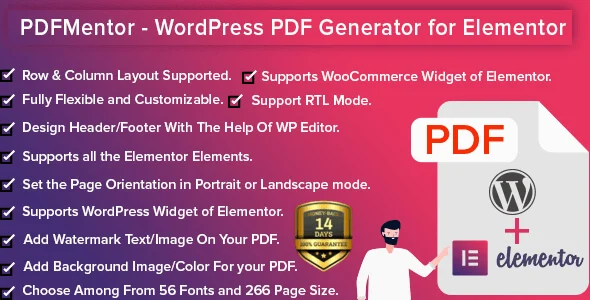
Generate professional, print-ready PDFs directly from your Elementor-designed WordPress site. PDFMentor Pro preserves your layout, columns, and brand identity — so every PDF looks exactly like your live website. Seamless integration with Elementor page builder Replicates your website layout and design in PDF format Supports pages, blogs, and custom post types Maintains column structure and element positioning Easy-to-use interface for beginners and professionals
From multipurpose themes to niche templates