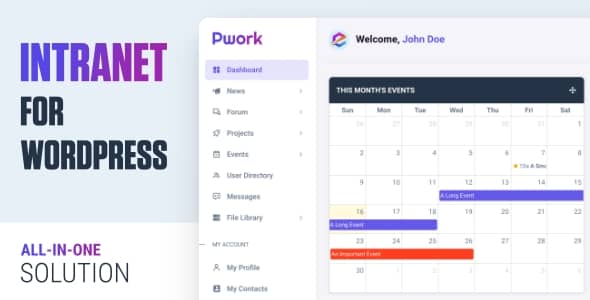
Pwork transforms your existing WordPress site into a fully functional intranet — no theme switch, no plugin stack required. Built on a modular Bootstrap 5 and AJAX architecture, it delivers a private collaboration hub where teams share news, manage projects, store documents, and communicate without leaving WordPress.
Whether you run a small business, a distributed team, or a growing organization, Pwork consolidates the tools that usually demand separate platforms: announcements, forums, project boards, calendars, a knowledge base, file storage, and direct messaging. Every module can be enabled or disabled independently, so performance stays lean.
Pwork fits any organization that needs a central internal hub. Remote teams use it to replace fragmented Slack threads, shared drives, and scattered docs. HR teams post policies to the knowledge base and announce updates via the news feed. Project leads track deliverables without a separate PM tool. IT admins appreciate the granular role controls and the ability to disable modules they don’t need.
Most intranet solutions force a theme change or demand a constellation of plugins. Pwork integrates cleanly into your current WordPress install, scales with modular feature toggles, and keeps the interface simple enough for daily use without training. Role-based permissions and email notifications mean it works for both open collaboration and controlled-access environments.
Yes. Pwork operates in its own dedicated area and is fully compatible with any WordPress theme.
Absolutely. The modular structure lets you turn off any feature via the advanced settings panel to keep the site lightweight.
You assign specific permissions — create posts, projects, topics, send messages, upload files — to WordPress user roles.
Yes. Users can enable email alerts in their profile settings for new activities and updates.
Yes. The plugin receives ongoing updates for new features, performance, security, and stability.
Pwork delivers a professional, functional WordPress intranet without the bloat, complexity, or theme restrictions of traditional solutions. If you’re ready to centralize your team’s communication, collaboration, and knowledge sharing under one roof, Pwork is the pragmatic choice.
Turn your WordPress site into a complete team intranet with Pwork. One lightweight plugin replaces multiple tools — personalized dashboards, news, forums, projects, calendar, knowledge base, file library, and private messaging — all working with any theme.Drag-and-drop personal dashboards per userCompany news, announcements & discussion forumsProject collaboration with task tracking & notificationsKnowledge base, file library & event calendar built inRole-based access control & email notificationsWorks with any WordPress theme, no bloat
From multipurpose themes to niche templates