banner

WP Latest Posts Addon – WordPress Recent Posts & News Display Plugin

img

Product Overview

WP Latest Posts Addon is a WordPress plugin built to solve a common challenge: presenting your newest content in a way that keeps visitors engaged. Whether you run a blog, magazine, portfolio, or business site, this plugin transforms standard post lists into visually compelling content blocks that match your brand and layout needs.

Instead of wrestling with custom queries or page builders, you select a content source, choose a theme, apply filters, and publish. Each news block operates independently, so you can mix a timeline on your homepage, a masonry grid on your blog archive, and a portfolio showcase on a landing page — all from the same plugin.

Key Features

  • Six Pre-Built Themes — Default (blank canvas), Hover Smoothly (sliding reveal), Masonry News Bulletin (compact category grid), Masonry Wall Grid (large cards with excerpts), Portfolio (image-first), and Timeline (chronological).
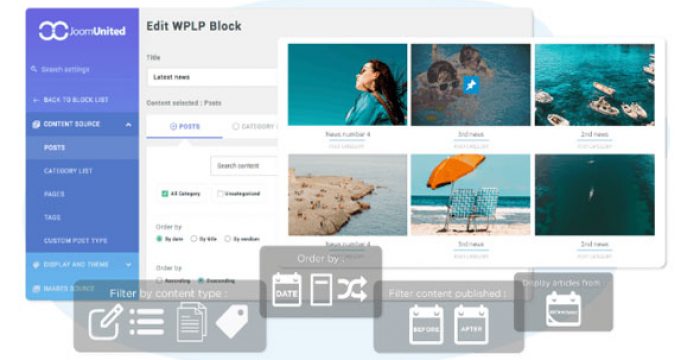
  • Flexible Content Sources — Pull from posts, pages, or any registered custom post type (products, events, testimonials, etc.).
  • Advanced Filtering — Narrow results by category, tag, author, date range, post status, and custom taxonomies.
  • Per-Block Configuration — Every instance of the plugin can use a different theme, source, and filter set.
  • Responsive & Lightweight — Clean output that adapts to mobile, tablet, and desktop without bloating page weight.
  • No Coding Required — Configure everything through the WordPress admin; shortcodes and Gutenberg blocks included for placement anywhere.

Benefits

  • Increase Time on Site — Visually rich layouts encourage visitors to explore more content.
  • Reduce Bounce Rate — Relevant, filtered content blocks guide users to related articles they might otherwise miss.
  • Save Development Time — Eliminate custom WP_Query templates and CSS maintenance.
  • Consistent Branding — Each theme accepts color, typography, and spacing controls to match your design system.
  • Future-Proof — Works with classic editor, Gutenberg, and major page builders (Elementor, WPBakery, etc.) via shortcode.

How It Can Be Used

  • Magazine & News Sites — Timeline theme for breaking news, Masonry Wall for feature stories.
  • Blogs & Content Hubs — Hover Smoothly for sidebar “Recent Posts” widgets that feel interactive.
  • Portfolios & Agencies — Portfolio theme to showcase case studies or client work with image-forward layouts.
  • E-Commerce — Display latest products, customer stories, or blog content in a Masonry Bulletin grid filtered by product category.
  • Corporate Sites — Timeline for press releases, Default theme for a minimal “Updates” section in the footer.

Specifications

  • Compatibility: WordPress 5.0+, PHP 7.4+
  • Included Themes: 6 (Default, Hover Smoothly, Masonry Bulletin, Masonry Wall, Portfolio, Timeline)
  • Content Sources: Posts, Pages, Custom Post Types
  • Filter Options: Category, Tag, Author, Date, Custom Taxonomies, Post Status
  • Output Methods: Shortcode, Gutenberg Block
  • Responsive: Yes
  • Translation Ready: Yes

Why Choose WP Latest Posts Addon?

Most “recent posts” plugins offer a single list style and minimal filtering. WP Latest Posts Addon gives you six distinct visual approaches — each purpose-built for a different content strategy — and the granular filtering to ensure every block shows exactly the right content. The per-block configuration means you install once and deploy unlimited variations across your site without conflicts or performance penalties.

Frequently Asked Questions

Does this plugin work with custom post types like WooCommerce products or Events Calendar events?

Yes. Any public custom post type registered on your site can be selected as a content source.

Can I use multiple themes on the same page?

Absolutely. Each shortcode or block instance is configured independently, so you can mix a Timeline in your header, a Masonry Wall in the main content, and a Portfolio grid in a sidebar.

Is there a limit to how many posts I can display?

The plugin respects WordPress query limits. You can set a specific number per block; performance scales with your hosting environment.

Do the themes support RTL languages?

The output follows your theme’s text direction. The included layouts are built with flexible CSS that adapts to RTL automatically.

Will this slow down my site?

The plugin is lightweight and uses standard WordPress queries. Caching plugins (WP Rocket, W3 Total Cache, etc.) cache the rendered output like any other content.

Conclusion

WP Latest Posts Addon replaces scattered widgets, custom code, and single-purpose plugins with one flexible tool. Six themes, deep filtering, and per-block control let you present the right content in the right format — everywhere on your site. Install it, configure your first block in minutes, and give your visitors a reason to keep reading.

Display your latest posts, pages, and custom post types with six professionally designed layouts. WP Latest Posts Addon gives you full control over content sources, filtering, and presentation — no coding required.6 distinct themes: Default, Hover Slider, Masonry Grid, Masonry Wall, Portfolio, and TimelineFilter by category, tag, author, date, and custom taxonomiesSupports posts, pages, and any custom post typeFully responsive and lightweight for fast loadingIndividual block configuration for mixed layouts on one page