Product Overview
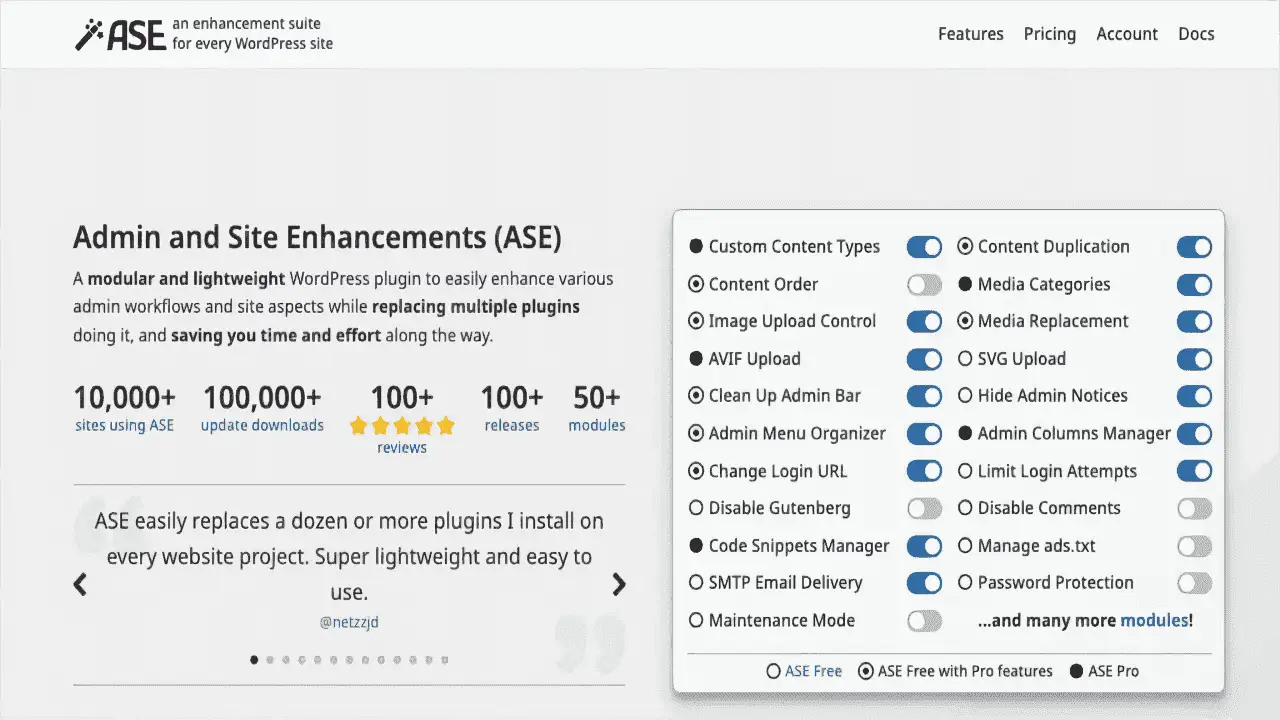
Administrative And Site Enhancements (ASE) Pro is a lightweight, modular WordPress plugin built to streamline administrative workflows. Instead of installing and maintaining separate plugins for menu management, media organization, code snippets, and image optimization, ASE Pro combines these capabilities into a single package — reducing plugin conflicts, lightening your site, and simplifying maintenance.
Whether you’re a solo site owner, a WordPress developer, or an agency managing dozens of client sites, ASE Pro gives you the tools to organize, optimize, and simplify daily operations from one centralized dashboard.
Key Features
- Administrative Menu Organizer — Take full control of your WordPress admin menu. Reorder, hide, or reorganize menu items to create a clean, customized workflow tailored to how you actually work.
- Custom Content Type Management — Extend WordPress beyond standard posts and pages. Create and manage personalized content types with clear, organized column overviews that make growing content libraries easy to navigate.
- Administrative Column Manager — Build custom column views for your content types. Surface the fields that matter most so you can scan, sort, and manage large libraries with confidence.
- Media Categories — Organize your media library with intuitive categories. Stop scrolling through thousands of unsorted files and find what you need in seconds.
- WebP Conversion on Upload — Automatically convert uploaded images to WebP format instead of JPEG or PNG. Smaller file sizes, faster page loads, and no visible quality loss — all handled securely in the background.
- Code Snippet Manager — Add, organize, and manage CSS, JavaScript, HTML, and PHP snippets directly from your dashboard. Modify design, behavior, and functionality without touching theme files or risking updates overwriting your changes.
- Export and Import Settings — Replicate your ASE configuration across unlimited WordPress sites with one click. Available on Team and Agency plans — ideal for agencies and developers who need consistent, repeatable setups.
Benefits
- Replace multiple plugins with one — Fewer plugins mean fewer conflicts, a lighter site, and simpler maintenance.
- Save time daily — Consolidated tools eliminate context-switching between separate plugin interfaces.
- Tailor the admin experience — Mold the WordPress dashboard to match your actual workflow, not the default.
- Improve site performance — WebP conversion and reduced plugin overhead contribute to faster load times.
- Scale across sites effortlessly — Export and import settings makes multi-site management repeatable and reliable.
How It Can Be Used
ASE Pro fits naturally into several WordPress workflows:
- Site owners and bloggers declutter their dashboard and organize media libraries without technical overhead.
- Developers manage code snippets safely, create custom content types for specialized projects, and keep admin menus focused on what clients actually need.
- Agencies standardize their baseline configuration across every client site using export/import, reducing onboarding time and configuration drift.
Why Choose ASE Pro?
ASE Pro stands out because it does more with less. The modular design means you only activate the features you need, keeping your WordPress installation clean and performant. Instead of evaluating, installing, updating, and troubleshooting four or five separate plugins — each with its own settings, quirks, and compatibility concerns — you manage one lightweight plugin that handles menu organization, media categorization, code snippets, and image optimization in a cohesive interface.
For agencies and developers, the export/import functionality transforms a repetitive setup process into a one-click operation, ensuring every site starts from the same vetted baseline.
Frequently Asked Questions
- Does ASE Pro replace multiple plugins?
- Yes. ASE Pro consolidates several common admin and optimization tools — including menu organization, media categorization, code snippet management, and WebP image conversion — into one plugin, reducing the need for multiple separate installations.
- Can I use ASE Pro on multiple websites?
- Absolutely. The export and import settings feature allows you to copy your ASE configuration to other WordPress sites. This functionality is available on the Team and Agency plans.
- Is WebP conversion safe for my images?
- Yes. ASE Pro converts uploaded images to WebP format in a smart and secure way, maintaining image quality while improving file size and page load performance.
- Do I need coding knowledge to use the snippet manager?
- ASE Pro’s code snippet manager lets you add and manage CSS, JS, HTML, and PHP snippets directly from your WordPress dashboard. While basic coding knowledge helps, the interface is designed to be straightforward and accessible.
- What WordPress versions is ASE Pro compatible with?
- ASE Pro is built as a modern WordPress plugin and is compatible with current WordPress installations. For the most up-to-date compatibility information, please refer to the plugin documentation.
Conclusion
ASE Pro gives you the tools to take full control of your WordPress admin experience. From organizing your menu and managing custom content types to converting images and handling code snippets, everything you need lives in one lightweight, modular plugin. Simplify your workflow, reduce plugin dependency, and make your WordPress dashboard work smarter for you.